
Offline maps you download before you need them
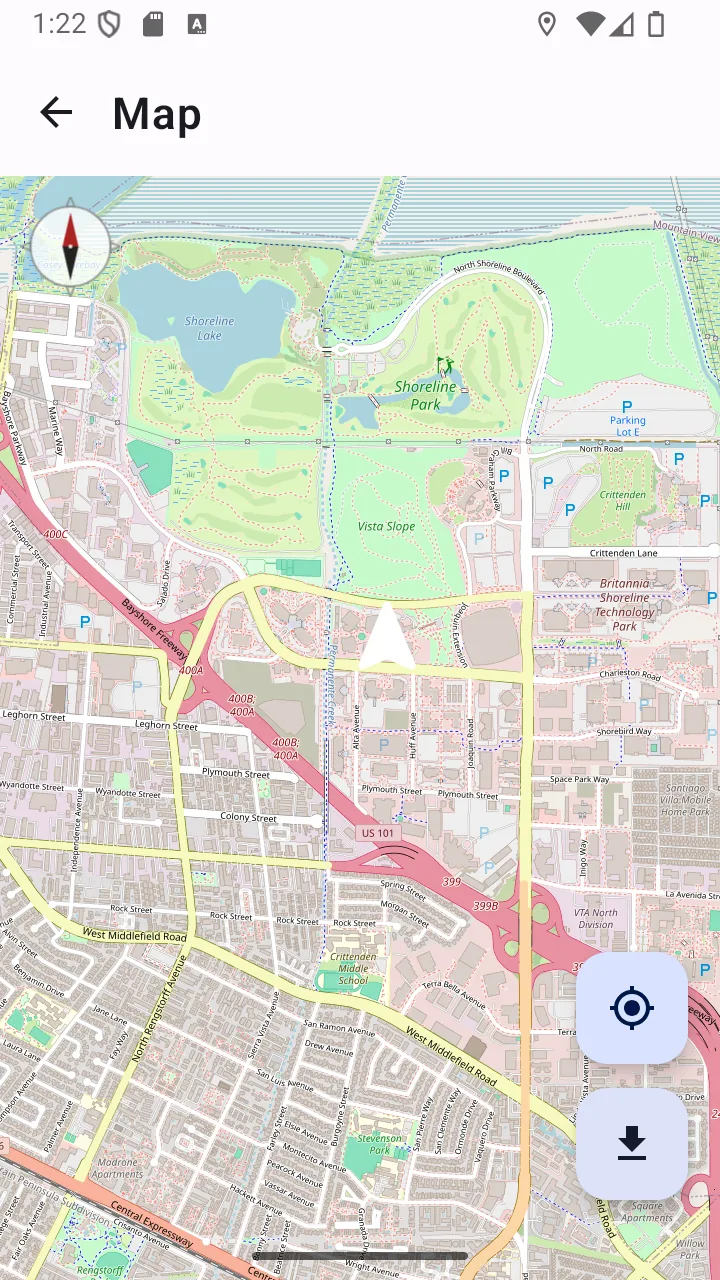
Offline maps only help if you thought about them first. This is the honest version of the feature: choose an area while you still have a connection, download its tiles, and from then on you can pan around that region with your GPS position drawn on top — no signal required.
The maps come from OpenStreetMap, the same open dataset used by countless navigation tools. The app keeps a 50 MB tile cache that refreshes every seven days when you are back online.
This is the one feature with a genuine two-step story: downloading map tiles needs a connection. Once cached, viewing them does not.
Why it matters
Prepared, not hopeful
Pick a region and download it deliberately before a trip. That is the difference between having a map in a dead zone and wishing you did.
Your position on the cached map
GPS works without a connection, so your live position appears on downloaded tiles with no network at all. A compass overlay shows which way you are facing.
Open map data
Built on OpenStreetMap, which covers footpaths, tracks and rural detail that road-focused maps often omit.
A cache that stays honest
Tiles expire after seven days so a long-cached area refreshes when you are next online, rather than quietly going stale.
What it does, precisely
- OpenStreetMap viewer with pan and zoom controls
- Download a chosen area for offline use
- Live GPS position drawn on cached tiles with no connection
- Compass overlay showing heading
- 50 MB tile cache with seven-day expiry
- Cached tiles stored on your device
Permissions
Requested when you first use the feature — never at install.
- ACCESS_FINE_LOCATION
- Draws your live position on the map. The map itself works without it — you simply will not see where you are.
- INTERNET
- Downloads map tiles from OpenStreetMap servers. Only used while downloading or refreshing an area; viewing cached tiles needs no connection.
Limits
Stated plainly so you know what this feature does not do — not just what it does.
- You must download the area while you still have a connection.
- A map viewer, not a routing engine — no turn-by-turn directions.
- The tile cache holds up to 50 MB; coverage depends on the zoom levels you choose.
Answers
Offline maps: common questions
Do offline maps work with no internet connection?
Cached areas do. You must download the area you want while you still have a connection — the tiles have to come from somewhere. After that, panning, zooming and seeing your GPS position on that area all work with no connection at all.
How much can I download?
The tile cache holds up to 50 MB. How much ground that covers depends on the zoom levels you download: a small area in fine detail and a large area in coarse detail can use similar space.
Does the map show my location offline?
Yes. GPS is a satellite signal that needs no data connection, so your position is drawn on downloaded tiles regardless of signal.
Does this replace a dedicated offline navigation app?
No. It is a map viewer with your position on it, not a routing engine — it will not calculate a route or give turn-by-turn directions. For serious backcountry navigation, carry a paper map and know how to use it alongside a compass.
Where does the map data come from?
OpenStreetMap, a collaborative open map of the world. Tiles are fetched from OpenStreetMap tile servers when you download an area.
Related features
- GPS locationCoordinates in decimal, DMS or UTM, ready to copy, share or read aloud — plus a live speed readout.
- CompassA magnetic compass driven by your phone’s own sensors, with a calibration indicator so you know to trust it.
- Battery monitorCharge level, current draw, temperature, health and time-to-empty — because every other tool depends on it.
- For hikingCompass, coordinates, a downloaded map and an SOS that sends a position rather than a guess.
- For campingLight that lasts, a map you downloaded, and battery detail so the phone survives the trip.
- For travellersThe local emergency number, your medical details and a downloaded map — before you need any of them.
Related guides
- What to do when you lose cell serviceLosing signal is not the same as losing your phone. A surprising amount still works, and there are specific things worth trying before you give up on getting a message out.
- Essential emergency tools for hikingA phone is a useful part of a hiking kit and a dangerous thing to rely on entirely. Here is the honest division of labour.
Get offline maps and 10 more tools
Free on Google Play. No account, no subscription, and the core tools keep working when the signal does not.
- 4.8 MB download
- Android 8.0+
- No account required