
Battery detail, because everything else depends on it
A torch, a GPS receiver and a siren all run on the same battery. In a situation where the phone is your toolkit, knowing how much of it is left — and how fast it is going — stops being a curiosity.
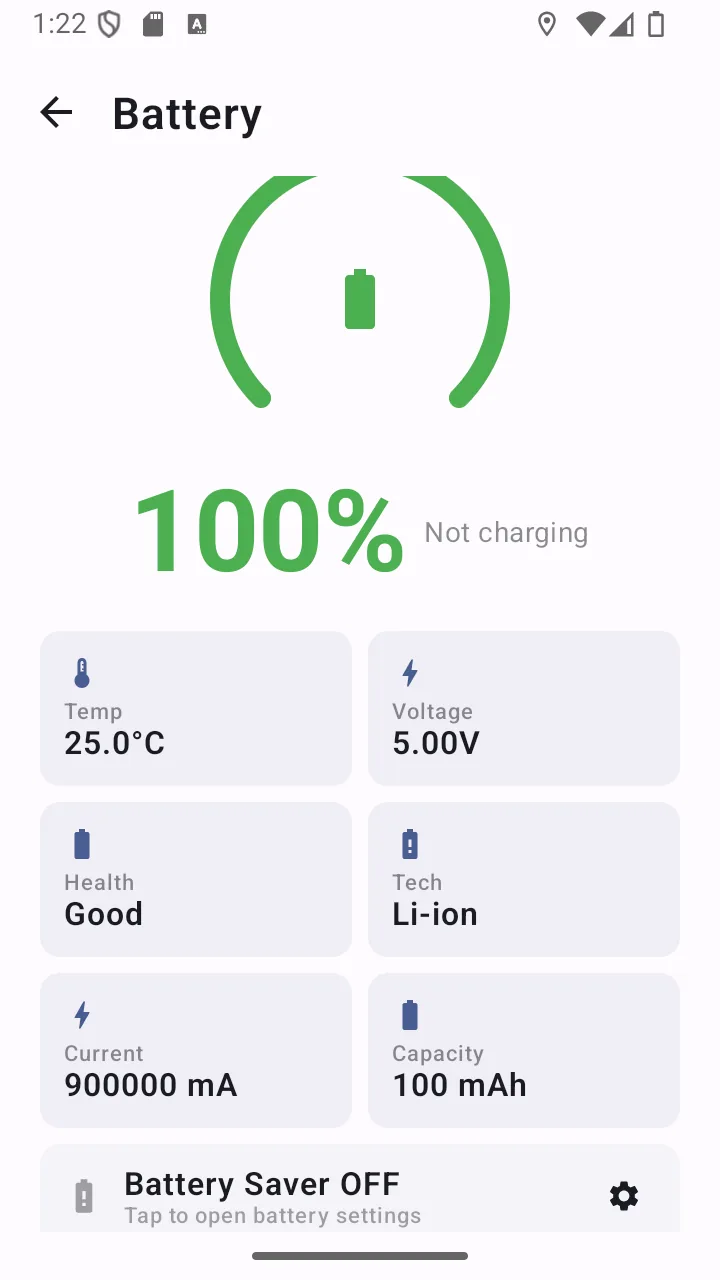
This screen shows the percentage most phones show, plus the details they usually hide: live current draw in milliamps, temperature, voltage, battery health, and an estimate of time remaining.
Reads the battery status your phone already tracks. No connection involved.
Why it matters
Time, not just percentage
Estimated time to empty when discharging, and time to full when charging — a more useful number than a percentage when you are deciding what to switch off.
See what is actually draining
Live current draw in milliamps reacts immediately, so you can see the cost of turning the torch on rather than guessing at it.
Temperature and health
Battery temperature and reported health matter in the cold, where capacity drops sharply, and over time as a cell degrades.
What it does, precisely
- Charge percentage with an arc gauge
- Live current draw in milliamps
- Estimated time to empty and time to full
- Battery temperature, voltage and reported health
- Design capacity readout
- Shortcut to the system battery-saver setting
- No permissions required
Permissions
Requested when you first use the feature — never at install.
- No permission required
- Battery status is broadcast by Android to any app without a runtime permission.
Limits
Stated plainly so you know what this feature does not do — not just what it does.
- Time-to-empty and time-to-full are estimates based on current drain, not a countdown clock.
- Cold temperatures reduce usable capacity — a reading can drop abruptly in freezing conditions.
Answers
Battery monitor: common questions
Does the battery monitor work offline?
Yes. It reads status information Android already broadcasts on the device. Nothing is fetched from a network.
How accurate is the time-remaining estimate?
It is an estimate based on your current rate of drain, so it moves as your usage changes. Turning on the torch will shorten it immediately. Treat it as a guide to relative cost, not a countdown clock.
Why does my battery drain faster in the cold?
Lithium-ion cells lose usable capacity at low temperatures — a phone that reads 40% in a warm room can shut down abruptly outdoors in freezing conditions. Keeping the phone in an inside pocket close to your body helps considerably. The temperature readout makes this visible.
Related features
- FlashlightInstant torch with an adjustable strobe, an automatic SOS Morse pattern and a red/blue screen flash.
- GPS locationCoordinates in decimal, DMS or UTM, ready to copy, share or read aloud — plus a live speed readout.
- Offline mapsCache an OpenStreetMap region while you have a connection, then browse it with your position on top when you do not.
- For campingLight that lasts, a map you downloaded, and battery detail so the phone survives the trip.
- For hikingCompass, coordinates, a downloaded map and an SOS that sends a position rather than a guess.
- For driversRoadside visibility, an exact position for recovery services, and SOS without unlocking.
Related guides
- How to prepare your Android phone for an emergencyA concrete setup walkthrough rather than a list of principles. Twenty minutes now, and most of it never needs revisiting.
- What to do when you lose cell serviceLosing signal is not the same as losing your phone. A surprising amount still works, and there are specific things worth trying before you give up on getting a message out.
Get battery monitor and 10 more tools
Free on Google Play. No account, no subscription, and the core tools keep working when the signal does not.
- 4.8 MB download
- Android 8.0+
- No account required