
SOS alerts that send your location, not just an alarm
An alarm tells people something is wrong. It does not tell them where you are. The SOS in Offline Emergency Toolkit does both: it sends your coordinates by SMS to the contacts you chose in advance, sounds a siren, and keeps a record of where you have been since activation.
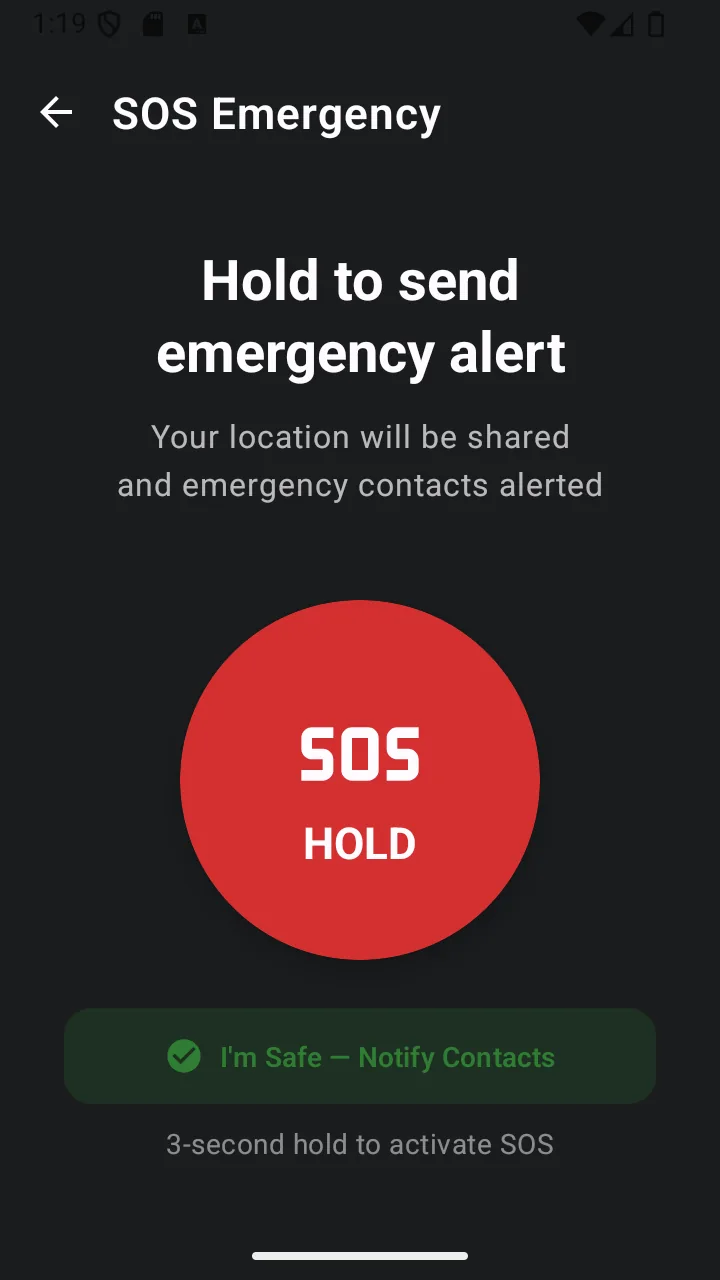
It is built around a deliberate delay. Long-press to begin, and a three-second countdown starts before anything is sent — long enough to cancel a mistake, short enough to matter.
Uses your phone’s SMS and GPS. Both work on a mobile network with no data connection — but they do need cell signal for the message to send.
Why it matters
Three seconds to change your mind
Activation goes idle → countdown → active. The countdown is three seconds with a visible cancel button and a haptic tick on each second, so an accidental press never becomes an accidental alert.
Coordinates, not a vague alarm
The outgoing message carries your GPS position. If you filled in a medical information card, that is included too — the details someone would otherwise have to ask you for.
A siren that carries
Activation plays an alternating 500/800 Hz tone through the alarm audio channel, so it follows your alarm volume rather than your media volume.
A trail, not a single pin
While SOS is active the app records your position roughly every 30 seconds. You can share the whole track as a GPX file, which mapping and rescue software can read directly.
What it does, precisely
- Long-press activation with a cancellable three-second countdown
- SMS alert containing your GPS coordinates, sent to your saved emergency contacts
- Medical information included in the alert when you have filled it in
- Alternating 500/800 Hz siren played on the alarm audio channel
- Haptic feedback during countdown and activation
- Location logged approximately every 30 seconds while active, exportable as GPX
- Lock-screen notification: open SOS directly, or start the countdown from the notification
- “I’m Safe” check-in that texts all your contacts a short all-clear message
- Country emergency number detected from your SIM, falling back to your locale
- Long messages split automatically so they are not silently truncated
- Dual-SIM aware — sends from your default SMS subscription
Permissions
Requested when you first use the feature — never at install.
- SEND_SMS
- Sends the alert text to your emergency contacts. Requested the first time you activate SOS or use I’m Safe — never at install.
- ACCESS_FINE_LOCATION
- Reads GPS coordinates to include in the alert and to record the location trail.
- POST_NOTIFICATIONS
- Required on Android 13 and newer to show the lock-screen SOS notification. Only requested if you enable that feature.
Limits
Stated plainly so you know what this feature does not do — not just what it does.
- Needs cell signal to deliver the SMS — it cannot send with no network at all.
- Not a replacement for calling the emergency services — call your local number first when you can.
Answers
SOS alerts: common questions
Does SOS work without an internet connection?
Yes. The alert is sent as an SMS and the coordinates come from your phone’s GPS receiver, neither of which uses mobile data or Wi-Fi. You do still need cell signal for the message to leave your phone — SMS cannot be delivered with no network at all.
What exactly gets sent to my emergency contacts?
A short text message containing your GPS coordinates, plus your medical information if you have filled that in. The message is sent from your phone through your normal mobile number, so replies go straight back to you.
Can I cancel an SOS I started by accident?
Yes. Activation runs through a three-second countdown with a cancel button on screen before anything is sent. Nothing leaves your phone until the countdown completes.
Does this replace calling the emergency services?
No, and it is not intended to. If you can call your local emergency number, call it first — that connects you to trained dispatchers who can send help. The SOS feature is for alerting the people who know you, and for the situations where a text will send but a call will not connect.
Can I trigger SOS without unlocking my phone?
Yes, if you enable the lock-screen SOS option. It places a persistent notification on your lock screen with a button that starts the countdown, plus a tap target that opens the SOS screen directly.
Related features
- Emergency contactsSave up to five contacts from your address book. They receive your SOS alerts and your all-clear.
- GPS locationCoordinates in decimal, DMS or UTM, ready to copy, share or read aloud — plus a live speed readout.
- Medical informationBlood type, allergies, medications and conditions — stored on your device and attached to SOS alerts.
- For hikingCompass, coordinates, a downloaded map and an SOS that sends a position rather than a guess.
- For travellersThe local emergency number, your medical details and a downloaded map — before you need any of them.
- For driversRoadside visibility, an exact position for recovery services, and SOS without unlocking.
Related guides
- How GPS can help during an emergencyGPS is the most misunderstood tool on a phone. It works without a data connection, and knowing how to use it changes a search into a collection.
- How to prepare your Android phone for an emergencyA concrete setup walkthrough rather than a list of principles. Twenty minutes now, and most of it never needs revisiting.
Get sos alerts and 10 more tools
Free on Google Play. No account, no subscription, and the core tools keep working when the signal does not.
- 4.8 MB download
- Android 8.0+
- No account required